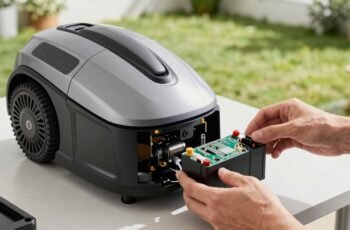
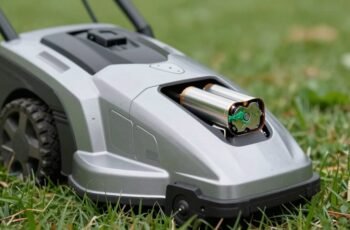
Few users realize that proper battery maintenance can greatly extend a robot mower’s lifespan, yet many overlook critical steps that could prevent costly replacements. Temperature fluctuations, connection integrity, and charging habits all influence battery health more than most assume. Ensuring ideal care requires understanding specific procedures and avoiding common pitfalls. To keep your mower operating reliably and efficiently, it’s essential to follow best practices poised to make a measurable difference—details that could save you time and money over the long term.
Key Takeaways
- Regularly inspect and clean battery contacts and terminals for corrosion or looseness.
- Fully charge the battery to about 80% before off-season storage to maintain health.
- Use manufacturer-approved chargers and avoid partial or incomplete charging cycles.
- Store the battery in a cool, dry, shaded environment between 10°C–25°C for optimal longevity.
- Perform periodic diagnostic checks to monitor internal resistance and detect early signs of degradation.
How to Check Your Robot Mower Battery Health
To guarantee peak performance and longevity of your robot mower, it’s essential to regularly assess the health of its battery. Begin by measuring the voltage with a multimeter when the battery is fully charged; compare this reading to the manufacturer’s specifications. A significant voltage drop indicates deterioration. Next, evaluate the capacity by noting the runtime during operation; a decline from original runtime suggests reduced battery efficiency. Conduct a load test by applying a controlled load and monitoring voltage stability. Additionally, inspect for physical signs of damage, swelling, or corrosion. Use diagnostic software if available, as it provides detailed parameters like internal resistance and cycle count. Consistent monitoring of these metrics ensures early detection of battery degradation, enabling timely maintenance or replacement to maintain maximum mower performance.
Tips for Properly Charging Your Robot Mower Battery
Properly charging your robot mower battery is essential for maintaining peak performance and extending its lifespan. We recommend using the charger supplied by the manufacturer, as incompatible chargers can cause overcharging or insufficient charging. Always connect the charger securely, ensuring proper contact with the battery terminals to prevent voltage fluctuations. Avoid partial charges; instead, aim for full charge cycles to optimize battery chemistry. Do not leave the battery connected to the charger beyond the recommended charging time, as overcharging can lead to capacity loss and overheating. Charging in a cool, dry environment helps preserve battery integrity and prevents thermal stress. Regularly monitor the charging process for any signs of malfunction, such as abnormal heat or swelling, and address issues promptly to avoid long-term damage.
Best Practices for Storing Your Robot Mower During Off-Season
When storing your robot mower during the off-season, guaranteeing proper preparation is essential to maintain its condition and optimize longevity. First, fully charge the battery to approximately 80% to prevent deep discharge, which can degrade cell capacity. Clean the mower thoroughly to remove dirt, grass, and debris, reducing corrosion risk during storage. Disconnect and remove the battery if possible, storing it in a cool, dry environment between 32°F and 68°F (0°C and 20°C). Avoid exposure to direct sunlight, humidity, or temperature fluctuations, as these conditions accelerate battery degradation. Additionally, inspect and lubricate moving parts, and ensure the mower’s firmware is up to date. Proper storage practices minimize corrosion, prevent battery capacity loss, and preserve the overall functionality of your robot mower.
Common Battery Maintenance Mistakes to Avoid
Failing to adhere to recommended charging routines is a common mistake that can considerably reduce your robot mower’s battery lifespan. Overcharging, undercharging, or inconsistent charging disrupts the battery’s chemical balance, accelerating capacity loss. Avoid leaving the battery at a full charge or completely discharged for extended periods, as this stresses the cells and promotes degradation. Using incompatible or faulty chargers can cause voltage irregularities, increasing the risk of thermal damage and capacity reduction. Additionally, neglecting to keep the battery contacts clean can impair efficient charging and discharging. Sharp temperature fluctuations during charging or storage also accelerate chemical breakdown within the cells. By following manufacturer guidelines and maintaining a consistent, suitable charging schedule, you help preserve battery health and ensure ideal mower performance over time.
How to Optimize Your Robot Mower’s Usage for Battery Longevity
To maximize battery lifespan, we recommend maintaining consistent charge cycles without deep discharges, which can stress the battery. Proper storage conditions, including a cool, dry environment, are crucial when the mower is not in use for extended periods. Adhering to these practices ensures peak performance and prolongs the overall battery life.
Regularly Charge the Battery
Regularly charging your robot mower’s battery is essential to maintaining ideal performance and prolonging its lifespan. Consistent charging ensures the battery remains within suitable voltage ranges, reducing capacity loss over time. To enhance charging practices:
- Avoid leaving the battery fully drained; recharge promptly after use.
- Use the manufacturer-recommended charger to prevent overvoltage or undervoltage issues.
- Schedule regular charges, ideally daily or after each mowing session, to maintain consistent charge levels.
- Store the mower in a climate-controlled environment to prevent temperature fluctuations that can affect charging efficiency.
Implementing these practices helps maintain battery health, ensuring reliable operation and extending overall lifespan. Proper charging routines are fundamental to maximizing your robot mower’s operational longevity.
Avoid Deep Discharges
Consistently maintaining proper charge levels helps prevent unnecessary stress on the battery, which can shorten its overall lifespan. Deep discharges, where the battery drops below 20%, increase chemical stress and accelerate capacity loss. To optimize longevity, avoid letting the battery fully deplete before recharging. Regular, partial charges are preferable, maintaining the battery within a safe voltage range.
| Risk of Deep Discharge | Battery Health Impact |
|---|---|
| Accelerated capacity loss | Reduced overall runtime over time |
| Increased chemical stress | Shortened battery lifespan |
| Higher likelihood of failure | More frequent replacements needed |
Implementing these practices guarantees sustained performance and extends your mower’s operational life.
Store in Proper Environment
Storing your robot mower in the correct environment is essential for preserving battery health over time. Proper storage minimizes exposure to conditions that accelerate battery degradation. To optimize longevity, consider the following:
- Keep the mower in a temperature-controlled area, ideally between 10°C and 25°C, avoiding extreme heat or cold.
- Store the mower in a dry environment to prevent moisture-related corrosion or electrical issues.
- Ensure the storage space has low humidity levels, which help prevent internal component corrosion.
- Disconnect the battery or ensure it’s partially charged (around 50-70%) if the mower will be inactive for extended periods, reducing stress on the cells.
Following these guidelines maintains battery capacity and extends overall lifespan.
Signs Your Robot Mower Battery Needs Replacement
When a robot mower’s battery begins to fail, several clear signs can indicate it’s time for a replacement. One primary indicator is a noticeable decline in runtime; the mower may struggle to complete its scheduled cut, requiring more frequent charging cycles. Additionally, increased charging times or inability to reach full capacity suggest diminished battery health. If the mower’s power output drops substantially during operation, it’s a sign the battery’s internal chemistry is degrading. Swelling or leakage around the battery compartment also signals imminent failure. Finally, inconsistent or erratic operation—such as abrupt shutdowns or failure to resume mowing—are strong indicators that the battery can no longer sustain proper performance. Recognizing these signs early can prevent unexpected failures and optimize overall mower efficiency.
Using Firmware Updates to Improve Battery Performance
Firmware updates can directly enhance battery efficiency and overall performance by addressing known software bugs and optimizing power management settings. Regularly applying these updates guarantees the mower operates with the latest improvements, reducing energy waste and extending battery life. Staying current with firmware is essential for maintaining peak battery performance and reliable operation.
Enhance Battery Efficiency
Regularly updating your robot mower’s firmware is essential for optimizing battery performance. Firmware updates often include improvements that enhance energy management, extend runtime, and improve charging cycles. To maximize these benefits, consider the following steps:
- Install updates promptly: Manufacturers release firmware updates to address inefficiencies and enhance battery algorithms.
- Configure power settings: Updates may include options to optimize power consumption based on your mowing schedule.
- Enable advanced diagnostics: Some firmware versions offer diagnostics tools that help identify battery issues early.
- Follow release notes: Understanding specific firmware improvements allows for targeted adjustments to operation or maintenance routines.
Implementing these steps ensures your mower operates at peak efficiency, prolongs battery lifespan, and minimizes energy waste through precise firmware management.
Fix Firmware Bugs
Identifying and fixing firmware bugs is critical for maintaining ideal battery performance in your robot mower. Firmware bugs can cause inefficient power management, unexpected shutdowns, or improper charging cycles, all of which degrade battery health over time. Regularly updating the firmware ensures that bugs affecting battery operation are addressed promptly. These updates often include improvements to power regulation algorithms, error correction, and hardware compatibility, directly enhancing battery longevity and efficiency. To implement updates, connect your mower to the manufacturer’s platform via Wi-Fi or USB, then follow the specified update protocol. Ensuring your firmware is current minimizes performance issues related to software flaws, reduces unnecessary battery drain, and maintains safe operation. Proper firmware management is integral to optimizing your mower’s overall battery lifespan and performance stability.
Optimize Power Management
By implementing firmware updates, we can substantially enhance the robot mower’s power management capabilities, leading to more efficient battery usage. Firmware updates often include algorithms that improve motor control, charging cycles, and power distribution, directly impacting battery longevity. To leverage these improvements, consider the following:
- Regularly check for firmware updates via the manufacturer’s app or website.
- Install updates promptly to benefit from the latest power management enhancements.
- Review update release notes for specific improvements related to battery efficiency.
- Reset and recalibrate the mower after updates to ensure peak performance.
Adopting these practices ensures the firmware operates with the latest power management protocols, maximizing battery life and operational efficiency.
How Environmental Conditions Affect Your Robot Mower Battery
Environmental conditions considerably influence the performance and longevity of your robot mower’s battery. Temperature fluctuations, humidity, and exposure to sunlight directly impact battery chemistry and efficiency. High temperatures accelerate chemical degradation, reducing overall lifespan, while cold conditions impair chemical reactions, decreasing runtime. Excess moisture can cause corrosion of internal components, leading to potential failure. To optimize battery health, it’s essential to consider these factors:
| Condition | Effect | Recommended Action |
|---|---|---|
| High temperatures | Accelerates chemical wear, shortens life | Store in shaded, cool area |
| Cold temperatures | Reduces chemical reactions, runtime | Store indoors during winter |
| Humidity | Causes corrosion, internal damage | Keep in dry, ventilated space |
| Sunlight exposure | Fades battery casing, damages internals | Cover when idle outdoors |
Troubleshooting Battery Issues in Your Robot Mower
When your robot mower’s battery begins to underperform or exhibit irregular behavior, it’s important to systematically troubleshoot the issue to determine the root cause. Start by checking the battery connections for corrosion or looseness, as poor contact can impair performance. Next, verify the charging station’s functionality, ensuring it provides consistent voltage output. Then, examine the battery’s age and capacity; a degraded battery may require replacement. Finally, analyze the mower’s firmware and software settings to confirm ideal operation parameters.
- Inspect connections and terminals for corrosion or damage
- Test the charging station’s voltage output and connection stability
- Evaluate battery age and capacity for signs of degradation
- Review firmware updates and calibration settings
Frequently Asked Questions
How Often Should I Replace My Robot Mower Battery?
We recommend replacing your robot mower battery every 2 to 3 years, depending on usage and battery condition. Regularly monitor performance and capacity, and replace it promptly when you notice decreased runtime or charging issues.
Can Using Third-Party Batteries Harm My Robot Mower?
Using third-party batteries can harm your robot mower by causing compatibility issues, reducing efficiency, or damaging internal components. We recommend using manufacturer-approved batteries to guarantee peak performance, longevity, and to avoid voiding warranties.
What Is the Typical Lifespan of a Robot Mower Battery?
Typically, robot mower batteries last around two to three years, depending on usage, maintenance, and battery quality. We recommend regular care and proper charging practices to extend battery life and guarantee peak performance over its lifespan.
Are There Eco-Friendly Options for Robot Mower Batteries?
We find eco-friendly robot mower batteries, like those using lithium iron phosphate, which reduce environmental impact by 70% compared to traditional lithium-ion options. These sustainable choices deliver reliable performance with minimized ecological footprint, aligning technology with environmental responsibility.
How Do I Dispose of an Old Robot Mower Battery Safely?
We dispose of old robot mower batteries at certified recycling centers, following local hazardous waste regulations. We handle them with care, avoiding punctures or damage, and guarantee they’re transported in secure, non-leaking containers to prevent environmental contamination.
Conclusion
By following these meticulous maintenance tips, we can substantially extend our robot mower’s battery life and guarantee peak performance. Yet, subtle signs of deterioration may go unnoticed, risking unexpected failures. Staying vigilant and proactive is vital — but are we truly prepared for the challenges that lie ahead? The key to long-term reliability might just depend on our next step. Are you ready to uncover the secrets to ultimate battery longevity?