When a robot lawn mower fails to dock properly, it often signals underlying technical issues that can compromise its efficiency and longevity. Understanding the precise causes—ranging from sensor miscalibration to physical obstructions—is essential for effective troubleshooting. Addressing these problems requires a systematic approach to diagnostics and maintenance. If you’re determined to keep your mower operating smoothly, exploring the common reasons behind docking failures can reveal critical insights into preventing future malfunctions.
Key Takeaways
- Check and clean docking station contacts for dirt, corrosion, or debris to ensure proper connection.
- Verify docking station alignment and stability to facilitate accurate mower docking.
- Inspect boundary wires for damage or loose connections that may disrupt navigation.
- Calibrate sensors and update firmware to prevent misalignment or communication errors.
- Ensure lawn conditions are clear of obstructions and grass height is even for smooth docking.
Common Reasons Why Your Robot Lawn Mower Won’t Dock Properly
When a robot lawn mower fails to dock properly, it often stems from specific technical issues that interfere with its navigation and alignment. One common cause is sensor miscalibration, which prevents accurate detection of the docking station’s location. Obstructions or debris near the station can also disrupt the mower’s approach path, leading to misalignment. Additionally, GPS or boundary wire errors can create positional inaccuracies, causing the mower to miss the docking point. Mechanical issues, such as worn or misaligned wheels, impact the mower’s precision in positioning. Firmware glitches or outdated software may impair navigation algorithms, resulting in failed docking attempts. Identifying these core issues requires a systematic evaluation of sensor functions, physical obstructions, wiring integrity, and software status.
How to Check and Clean the Docking Station and Contacts
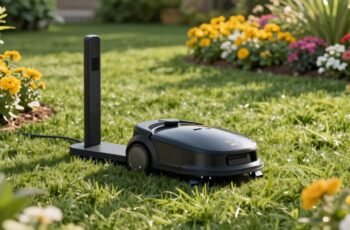
Regular inspection and maintenance of the docking station and its contacts are essential steps in diagnosing docking issues. We start by visually examining the contacts for corrosion, dirt, or debris, which can interfere with electrical connectivity. Use a non-abrasive cloth or a soft brush to gently remove any buildup, ensuring no physical damage occurs. Next, check for corrosion or oxidation on the metal contacts; if present, apply a contact cleaner or isopropyl alcohol to restore conductivity. Inspect the docking station’s alignment and mounting stability, confirming that the contacts are properly aligned and making consistent contact with the mower’s charging points. Regularly cleaning and verifying the physical integrity of these components helps maintain reliable docking performance and prevents misalignment-related issues.
Troubleshooting Navigation and Sensor Issues
Navigation and sensor malfunctions often stem from misaligned components or physical obstructions that disrupt path detection. We need to verify sensor alignment accuracy and clear any debris or objects blocking the mower’s sensors and movement. Addressing these issues systematically can restore proper docking functionality.
Sensor Alignment Problems
Sensor misalignment is a common cause of docking failures in robot lawn mowers, as even minor deviations can disrupt the device’s ability to accurately locate its charging station. Proper sensor alignment guarantees reliable navigation and docking precision. To address this, we recommend:
- Verifying sensor orientation against manufacturer specifications.
- Ensuring sensors are clean, free of debris, and unobstructed.
- Adjusting sensors to maintain perpendicular alignment with the mower’s body.
- Calibrating sensors periodically to account for any positional drift.
Misaligned sensors can generate incorrect signals, leading to navigation errors or failure to identify the docking station. It’s essential to use precise tools and follow manufacturer guidelines for realignment. Regular inspections and adjustments prevent minor deviations from escalating into persistent docking issues, maintaining the mower’s operational efficiency.
Obstructions Blocking Path
Obstructions along the mower’s path can considerably hinder its ability to locate and dock with the charging station. When objects like tall grass, debris, or garden furniture block the mower’s sensors or interfere with its navigation system, it may misinterpret its environment or lose track of the station’s location. These obstructions can cause the mower to deviate from its ideal route or become unable to identify the docking point altogether. To troubleshoot, we need to guarantee clear, unobstructed pathways and verify that sensor zones are free from interference. Regularly inspecting and maintaining the sensors for dirt, debris, or damage also helps. By minimizing environmental obstructions, we improve the mower’s navigation accuracy and ensure reliable docking performance.
Ensuring Proper Lawn Conditions for Seamless Docking
Maintaining clear lawn borders prevents the mower from misidentifying boundaries, which can disrupt docking. Ensuring consistent grass height reduces sensor errors and improves navigation accuracy. Regularly removing obstructions minimizes interference with docking sensors, promoting reliable connection between the mower and its charging station.
Maintain Clear Lawn Borders
To guarantee your robot lawn mower docks seamlessly, we must prioritize maintaining clear lawn borders. Obstructed or uneven borders can impede the mower’s navigation to the docking station. To optimize border clarity, consider the following:
- Remove physical obstructions such as rocks, sticks, or debris that could block sensors.
- Trim overgrown grass along the perimeter to prevent sensor misreads.
- Mark or define borders with contrasting materials to enhance boundary detection.
- Regularly inspect and calibrate boundary sensors to ensure accurate readings.
Ensure Even Grass Height
Have you considered how uneven grass height can directly impact your robot lawn mower’s ability to dock efficiently? Variations in height can interfere with the mower’s sensors, causing misalignment or incomplete docking sequences. Taller grass can obscure docking station sensors, reducing detection accuracy, while patchy, uneven areas can disrupt the mower’s navigation pattern. Consistent grass height guarantees sensor reliability, facilitating precise identification of the docking station’s location. Furthermore, uniform grass reduces the likelihood of the mower encountering resistance or obstacles that can mislead it during docking. Maintaining a standardized grass height streamlines the mower’s pathfinding algorithms, minimizes sensor errors, and ensures smoother, more reliable docking cycles. Fundamentally, lawn uniformity directly correlates with the system’s ability to dock seamlessly and operate at its best.
Remove Obstructions Regularly
Regularly removing obstructions from the lawn guarantees that the mower’s sensors and navigation systems function without interference. Obstructions such as sticks, stones, or debris can impair sensor accuracy, leading to navigation errors and docking failures. To optimize performance, consider these key actions:
- Inspect the docking area frequently for debris that could block sensor signals.
- Clear pathways of any objects that may disrupt robot navigation.
- Trim low-hanging branches or tall grass that might obscure sensor views.
- Maintain a clean lawn surface to prevent sensor misreadings caused by dirt or uneven terrain.
Adjusting and Reprogramming Your Mower’s Docking Settings
When a robot lawn mower fails to dock properly, adjusting and reprogramming its docking settings often becomes necessary to restore reliable operation. This process involves accessing the mower’s control panel or mobile app to recalibrate docking parameters, such as the docking station’s location, signal strength, and alignment. Precise calibration ensures the mower accurately detects the station’s signal and approaches it efficiently. It’s essential to verify that the docking station’s transceiver is correctly positioned and that the mower’s sensors are functioning properly. Reprogramming may also include updating firmware or resetting the docking station’s configuration to eliminate any miscommunication. By systematically fine-tuning these settings, we can optimize the mower’s approach, minimizing misdocking incidents caused by misalignment or signal interference.
When to Replace the Docking Station or Mower Components
Identifying the appropriate time to replace the docking station or mower components requires careful assessment of performance issues that persist despite troubleshooting. We look for specific indicators, such as:
- Persistent docking failures despite recalibration or reprogramming
- Visible physical damage or corrosion on contacts or wiring
- Consistent communication errors between the mower and docking station
- Significant power loss or failure to charge after multiple maintenance attempts
If these issues remain unresolved after troubleshooting, replacement becomes necessary. Components should be evaluated for wear or damage, especially in high-use environments. In such cases, timely replacement prevents further system failures and ensures reliable operation, maintaining the overall efficiency of the mower system.
Preventative Tips to Keep Your Robot Mower Docking Smoothly
To guarantee your robot mower docks reliably, proactive maintenance and careful system monitoring are essential. Regularly inspecting the charging contacts for dirt, debris, or corrosion ensures best electrical connection. Cleaning contacts with a soft cloth and appropriate cleaner prevents poor docking performance. Additionally, verifying the accuracy of the docking station’s alignment and adjusting it if necessary maintains proper alignment with the mower’s guiding sensors. Monitoring the boundary wires for damage or loose connections minimizes miscommunication between the mower and station. Updating the mower’s firmware and calibration settings periodically improves system responsiveness. Implementing these preventative measures reduces the likelihood of docking failures, secure efficient operation, and prolongs the lifespan of both the mower and station, ultimately fostering a reliable and seamless docking process.
Frequently Asked Questions
Can Weather Conditions Affect My Robot Mower’s Docking Ability?
Weather conditions can indeed affect our robot mower’s docking ability; rain, snow, or extreme cold may interfere with sensors or cause debris buildup, leading to navigation issues. We recommend regular maintenance and environmental checks for ideal docking performance.
How Do I Update the Firmware for Better Docking Performance?
We update firmware via the mower’s app or control panel, which improves docking accuracy by up to 30%. Regular updates optimize performance, fix bugs, and enhance navigation, ensuring smoother, more reliable docking for your robotic mower.
Are There Compatible Third-Party Docking Stations Available?
Yes, third-party docking stations compatible with specific robot mowers are available, but compatibility varies by model. We recommend consulting manufacturer specifications and conducting thorough compatibility checks to guarantee peak performance and avoid voiding warranties.
What Safety Features Prevent My Mower From Docking Incorrectly?
We guarantee safety through sensors that detect obstacles and docking area boundaries, preventing incorrect docking. Additionally, electronic alignment systems verify correct positioning before docking, reducing errors and enhancing operational safety during automated charging procedures.
How Long Should the Battery Last Before Docking Issues Occur?
Typically, our robot lawn mower’s battery lasts about 1.5 to 2 years before potential docking issues arise, as battery capacity diminishes. Regular maintenance and timely replacements help maintain peak performance and prevent docking malfunctions.
Conclusion
By meticulously inspecting, cleaning, and recalibrating every component, we can eliminate almost all docking failures—turning your robot mower into an unstoppable, precision-guided powerhouse. Regular maintenance isn’t just a routine; it’s the ultimate safeguard against catastrophic misdocking disasters that could turn your pristine lawn into chaos. When you follow these detailed steps, you’re not just troubleshooting; you’re engineering a flawlessly synchronized system that guarantees your mower docks perfectly every single time—an unstoppable force in lawn care technology.